> ## Documentation Index
> Fetch the complete documentation index at: https://larkup.de/documentation/llms.txt
> Use this file to discover all available pages before exploring further.
# Agent Server API
> Launch a Larkup Agent Server, customize it, and connect through REST, the SDK, or Scalar.
Developer
## Launch locally
Open **Settings → Larkup Server**, switch the toggle to **Agent**, and select **Launch server**. Restart it after changing the Agent's prompt, skills, or tools so the generated runtime picks up the new configuration.
 Copy the endpoint and **Server API key** from this page. Every request must include the key in the `Authorization` header.
## Customize the Agent
Open **Settings → Agent Customization**. It has five tabs that control what the Agent knows and can do.
Write the system prompt the Agent follows. Larkup combines it with its own retrieval and tool safety rules.
Copy the endpoint and **Server API key** from this page. Every request must include the key in the `Authorization` header.
## Customize the Agent
Open **Settings → Agent Customization**. It has five tabs that control what the Agent knows and can do.
Write the system prompt the Agent follows. Larkup combines it with its own retrieval and tool safety rules.
 Turn built in tools on or off: semantic search, tabular data queries, chart generation, the Python sandbox, indexed data lookup, corpus analysis, and form filling.
 Add a Skill in the open `SKILL.md` format: metadata plus task instructions and optional resources. Upload a local file or add a remote one.
 Connect a remote [Model Context Protocol](https://modelcontextprotocol.io/) server. Add its URL, test it to discover its tools, then enable it. Its tools become available to this Agent, namespaced by connection so they never override a built in tool.
 Give your Agent access to a computer, so it can run code instead of just describing it. Run it locally with Local Sandbox or Local Docker, or hand it to a remote provider such as E2B, Vercel Sandbox, Modal, Daytona, Fly.io Sprites, or Northflank. A remote sandbox is required for a serverless deployment that needs code execution.
 Select **Verify** after saving to confirm the chosen sandbox is reachable.
## Endpoints
Every generated server serves an interactive reference at `GET /reference` and a machine readable contract at `GET /openapi.json`.
Select **Verify** after saving to confirm the chosen sandbox is reachable.
## Endpoints
Every generated server serves an interactive reference at `GET /reference` and a machine readable contract at `GET /openapi.json`.
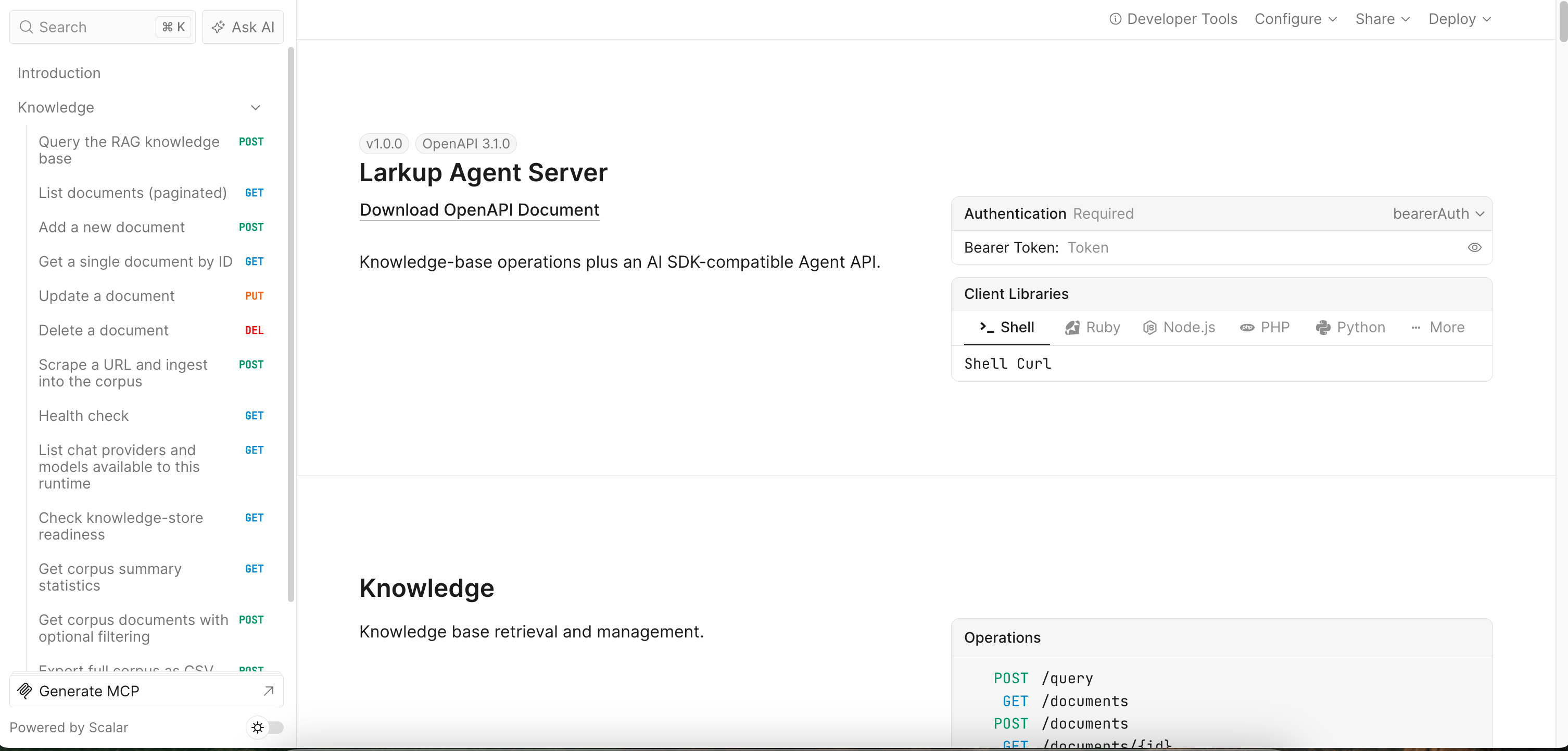 | Endpoint | Purpose |
| ---------------------------------- | ----------------------------------------------------------- |
| `GET /agent` | Read the Agent name, profile, and loaded tools. |
| `GET /agent/tools` | List every loaded tool. |
| `GET /agent/capabilities` | List enabled skills, sandbox, MCP connections, and plugins. |
| `POST /chat` or `POST /agent/chat` | Stream a response using the AI SDK message protocol. |
| `POST /v1/chat/completions` | OpenAI compatible chat completions, streamed by default. |
| `POST /query` | Retrieve the most relevant chunks for a query. |
## Connect
```bash cURL theme={null}
curl -X POST http://localhost:8080/chat \
-H "Authorization: Bearer your-api-key" \
-H "Content-Type: application/json" \
-d '{"messages": [{"role": "user", "content": "Summarize the Q3 report"}]}'
```
```typescript TypeScript SDK theme={null}
import { LarkupAgentClient } from '@larkup/sdk';
const agent = new LarkupAgentClient({ baseUrl: 'http://localhost:8080', apiKey: 'your-api-key' });
console.log(await agent.chatText('What can you find in our knowledge base?'));
```
```python Python SDK theme={null}
from larkup import LarkupAgentClient
agent = LarkupAgentClient(base_url="http://localhost:8080", api_key="your-api-key")
print(agent.chat_text("What can you find in our knowledge base?"))
```
The full endpoint list is in the [API Reference](/documentation/documentation/api-reference/overview) tab. To connect from the Vercel AI SDK, see [Vercel AI SDK](/documentation/documentation/sdk/integrations/ai-sdk).
## Authentication
`/health`, `/readiness`, `/reference`, and `/openapi.json` stay public for operations and discovery. Every other Knowledge and Agent request needs `Authorization: Bearer `.
## Deploy and connect remotely
Open **Settings → Larkup Server → Server** and select **Deploy** to choose a cloud provider. Larkup generates the runtime from the same Agent configuration used locally, including skills, MCP connections, and model settings. Use the same SDK client with the deployed URL. See [Deploy Your Server](/documentation/documentation/developer/deploy) for provider details.
| Endpoint | Purpose |
| ---------------------------------- | ----------------------------------------------------------- |
| `GET /agent` | Read the Agent name, profile, and loaded tools. |
| `GET /agent/tools` | List every loaded tool. |
| `GET /agent/capabilities` | List enabled skills, sandbox, MCP connections, and plugins. |
| `POST /chat` or `POST /agent/chat` | Stream a response using the AI SDK message protocol. |
| `POST /v1/chat/completions` | OpenAI compatible chat completions, streamed by default. |
| `POST /query` | Retrieve the most relevant chunks for a query. |
## Connect
```bash cURL theme={null}
curl -X POST http://localhost:8080/chat \
-H "Authorization: Bearer your-api-key" \
-H "Content-Type: application/json" \
-d '{"messages": [{"role": "user", "content": "Summarize the Q3 report"}]}'
```
```typescript TypeScript SDK theme={null}
import { LarkupAgentClient } from '@larkup/sdk';
const agent = new LarkupAgentClient({ baseUrl: 'http://localhost:8080', apiKey: 'your-api-key' });
console.log(await agent.chatText('What can you find in our knowledge base?'));
```
```python Python SDK theme={null}
from larkup import LarkupAgentClient
agent = LarkupAgentClient(base_url="http://localhost:8080", api_key="your-api-key")
print(agent.chat_text("What can you find in our knowledge base?"))
```
The full endpoint list is in the [API Reference](/documentation/documentation/api-reference/overview) tab. To connect from the Vercel AI SDK, see [Vercel AI SDK](/documentation/documentation/sdk/integrations/ai-sdk).
## Authentication
`/health`, `/readiness`, `/reference`, and `/openapi.json` stay public for operations and discovery. Every other Knowledge and Agent request needs `Authorization: Bearer `.
## Deploy and connect remotely
Open **Settings → Larkup Server → Server** and select **Deploy** to choose a cloud provider. Larkup generates the runtime from the same Agent configuration used locally, including skills, MCP connections, and model settings. Use the same SDK client with the deployed URL. See [Deploy Your Server](/documentation/documentation/developer/deploy) for provider details.